
Customer CommunitySupportProduct Download|
Company
ERP Cloud Toolbox · Compare

More4apps vs. FBDI
Designed for end users, not IT.

Oracle's free Excel-based loaders work but only for technical users.
See how the ERP Cloud Toolbox handles the same workload but with extensive functionality — truly built for the people who own the data.
HOW IT STACKS UP

How does the ERP Cloud Toolbox compare to Oracle's tools?

More4apps' simple, flexible Excel-based interface gives business users the confidence to update and maintain data accurately and at scale, without needing to wait on IT assistance.
  • Download Oracle ERP data in real time with a single click
  • Add attachments, update records, and upload changes from a single spreadsheet
  • Validate your data instantly against your Oracle instance at any stage of the process
  • Identify and fix errors before they hit Oracle, with clear error messaging in your spreadsheet
  • Configure your template layouts using Excel's complete functionality (add, remove, reorder, or copy columns)
  • Compatible across all recent Excel and Windows versions; flexible and resilient to updates.
Explore the ERP Cloud Toolbox
WHY COMPANIES CHOOSE MORE4APPS

A data loading tool tailored to your business needs, not the other way around.

Where FBDI and ADFdi end, the ERP Cloud Toolbox starts. Built for spreadsheet-fluent business users — not Oracle consultants or IT admins.

Download data in real time

Instantly pull Oracle data into Excel for updates or maintenance. One-click downloads eliminate complex templates and staging, making data management faster and easier for end users.
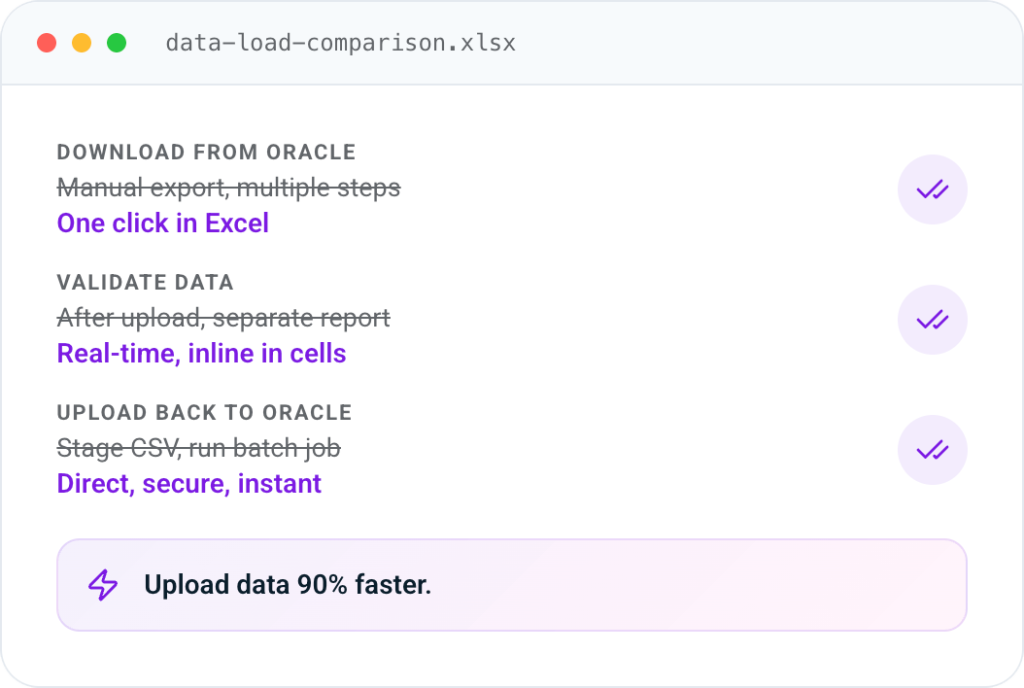
Upload data (with attachments)

Push updates to Oracle from a single, familiar spreadsheet. Add attachments, update records, and upload changes with one click — no extra tools or steps required.

Validate data instantly

Validate all or selected data in the spreadsheet at any stage of the process. Unlike Oracle tools that only validate after the data is loaded, our solution checks accuracy against your Oracle instance in real time.

Easily identify & correct errors

See errors directly in your spreadsheet with clear, highlighted messages. Quickly identify and fix issues without chasing separate reports — saving time and reducing frustration.

Configure your layouts

Tailor your spreadsheet layouts with full Excel functionality. Add, remove, reorder, or copy columns to match your workflow, and easily reuse templates.
Feature Matrix

ERP Cloud Toolbox vs. Oracle Forms, ADFdi, and FBDI.

Side-by-side capabilities — every data loading feature that matters to an Oracle Fusion Cloud team.
 
Oracle User Forms
Oracle ADFdi
Oracle FBDI
M4 ERP Cloud Toolbox
End-user independence from IT
Precise error reporting in the worksheet
Download existing data objects
All data in a single worksheet
Real-time data validation
Data entry forms
Customize and save layouts
Supports mass data entry
Data upload is supported by Oracle
Oracle-secured end-user connection
THE TRADE-OFFS

Pros and cons of the Oracle alternatives.

Where ADFdi and FBDI genuinely help — and where they hand the work back to IT, support, and your data owners.
Oracle Tool

Oracle ADFdi

Real-time, IT-leaning
Pros
  • Included as part of the Oracle license — no additional cost.
  • Useful for IT consultants and technical users.
  • Runs close to real time.
  • More user-friendly than FBDI for some processes.
  • Protected by Cloud ERP security features.
Cons
  • Limited set of seeded templates.
  • Limited end-user interface — built for technical staff, not business owners.
  • Functionality is inconsistent between templates, limiting usability.
  • Significant re-testing and patching required after Oracle updates.
  • Only available for a limited number of business processes.
  • Not designed for migration loads with large, static datasets.
  • Often missing download features — primarily an upload tool.
Oracle Tool

Oracle FBDI

Bulk loads, batch-oriented
Pros
  • Included as part of the Oracle license — no additional cost.
  • Useful for migration loads with a large, static dataset.
  • Useful for IT consultants and technical users.
  • Numerous templates spanning many modules.
  • Protected by Cloud ERP security features.
Cons
  • Separate sheet for each level of data — not user-friendly for data owners.
  • Functionality is inconsistent between the templates, limiting usability.
  • Uploads are not real-time — bulk batch only.
  • Difficult feedback loop: manual fixes after errors are identified.
  • Errors are returned as a PDF report — not inline in the spreadsheet.
  • No live download of existing Oracle data into the template.
Speak to one of our experts about why data owners prefer the More4apps ERP Cloud Toolbox.
Schedule a Custom Demo
The Big Idea

Your smarter, more intuitive Excel interface for Oracle.

Combine Microsoft Excel and Oracle Fusion Cloud ERP so users can control, manipulate, upload, and download data from within a fully functioning spreadsheet — without compromising the integrity of your single source of truth.

Mass uploads of master and transactional data flow through one simple interface. Data is validated before it's uploaded, reducing errors and giving the business decisions to act on — not reconciliation work to chase.

See how it works
Microsoft Excel
Familiar interface your team already uses
More4apps ERP Cloud Toolbox
Real-time validation & secure connection
Oracle Fusion Cloud ERP
Your single source of truth
ARCHITECTURE

Built on foundations you already trust.

  • Compatible with recent Microsoft Excel and later versions
  • Oracle Fusion Cloud-native — built for ERP Cloud
  • Single sign-on compliant
  • Easy to install (Excel add-in) and implement
  • Uses Oracle-supported web services
  • Uses your Oracle ERP login authentication
  • Employs Oracle ERP Cloud security — access granted by role to each web service
  • Updates with Oracle's quarterly release schedule
Resources

Keep reading.

Brochures, case studies, videos, and webinar recordings — all the homework, none of the sales pitch.

Give your business users control of their data.

Talk to a Fusion Cloud specialist. Walk us through your FBDI or ADFdi pain points and see what the ERP Cloud Toolbox would do with them.
Book a DemoContact Us
30-minute demo, no commitment